Skip to content

Estimate tracking

Know when they’re ready to say yes.

Send your estimate as a link. See when it’s opened, what they read, and get a follow-up text written for you.

Free for 5 proposals a month.

0:43An estimate goes out, the homeowner reads it on her phone, the alert lands, her row turns hot, and the next move gets written.

How it works

Three steps. You already do two of them.

  1. 01

    Upload your estimate

    The PDF you already make. Proposal Pulse turns it into a link that opens cleanly on any phone.

  2. 02

    Send the link

    Text it or email it, the way you send estimates now. It opens in the browser. No app, no account.

  3. 03

    Know when they’re ready

    An alert the moment it’s opened. A summary when they’re done: what they read, for how long, and a text to send next.

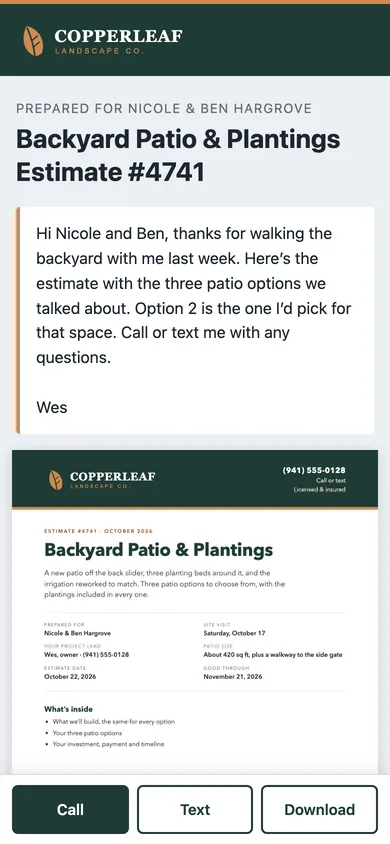
A landscaping estimate open on a phone, with a note from the owner and Call, Text and Download buttons
What the homeowner opens, with Call, Text and Download always in reach.

What you see

What you see after you hit send.

Every estimate gets a status and an interest score. Every visit gets a summary. Every lead gets a next step.

Pipeline

Every estimate, ranked by interest.

Each one carries a status (Not opened, Looked, Warm, Hot, Gone quiet) and a score out of 100, built from what they actually did: opening it, reading it, coming back, opening it on a second device. You can tell who’s close at a glance.
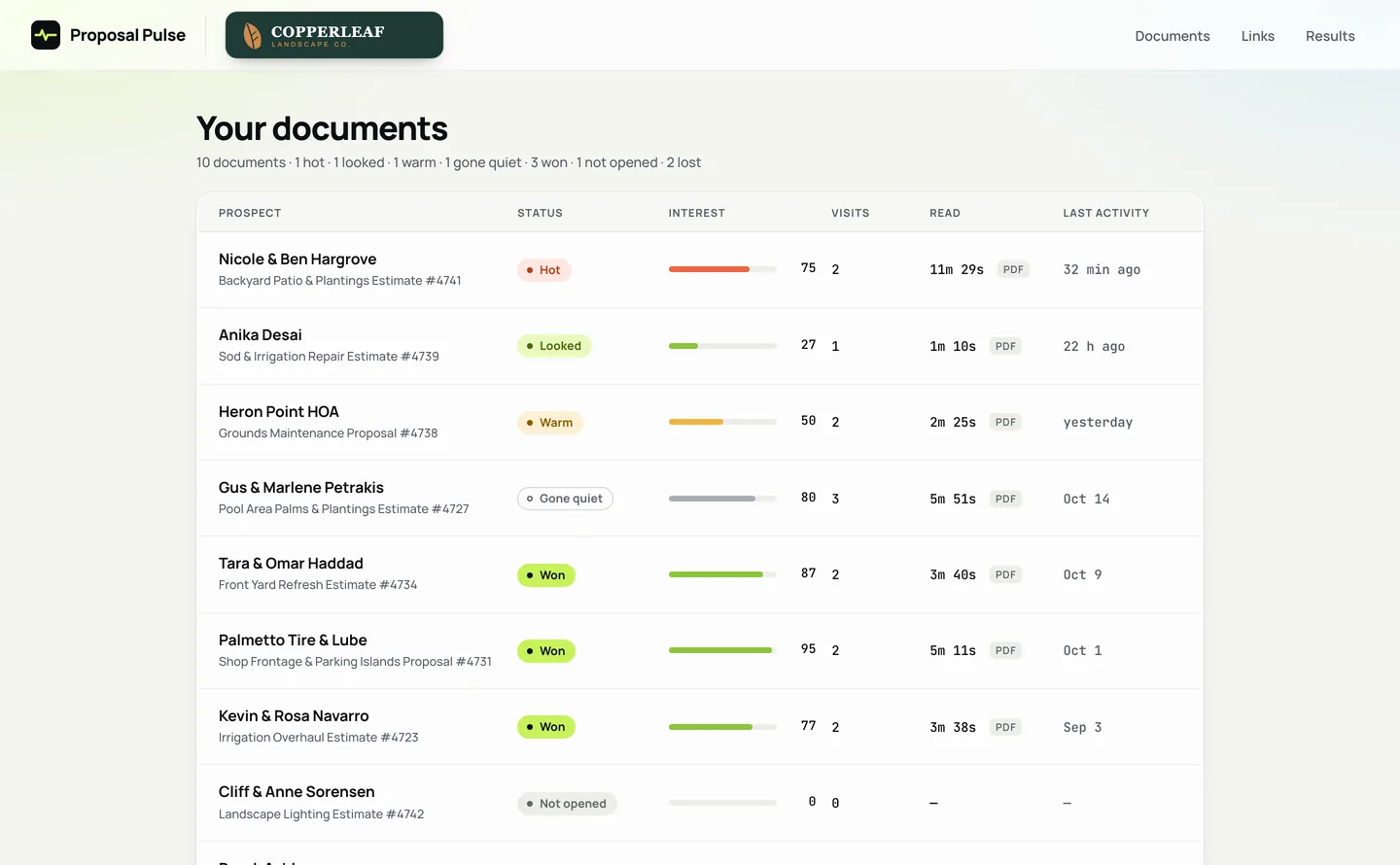
The pipeline: each estimate with its status, an interest score, visits, reading time and last activity

Visits

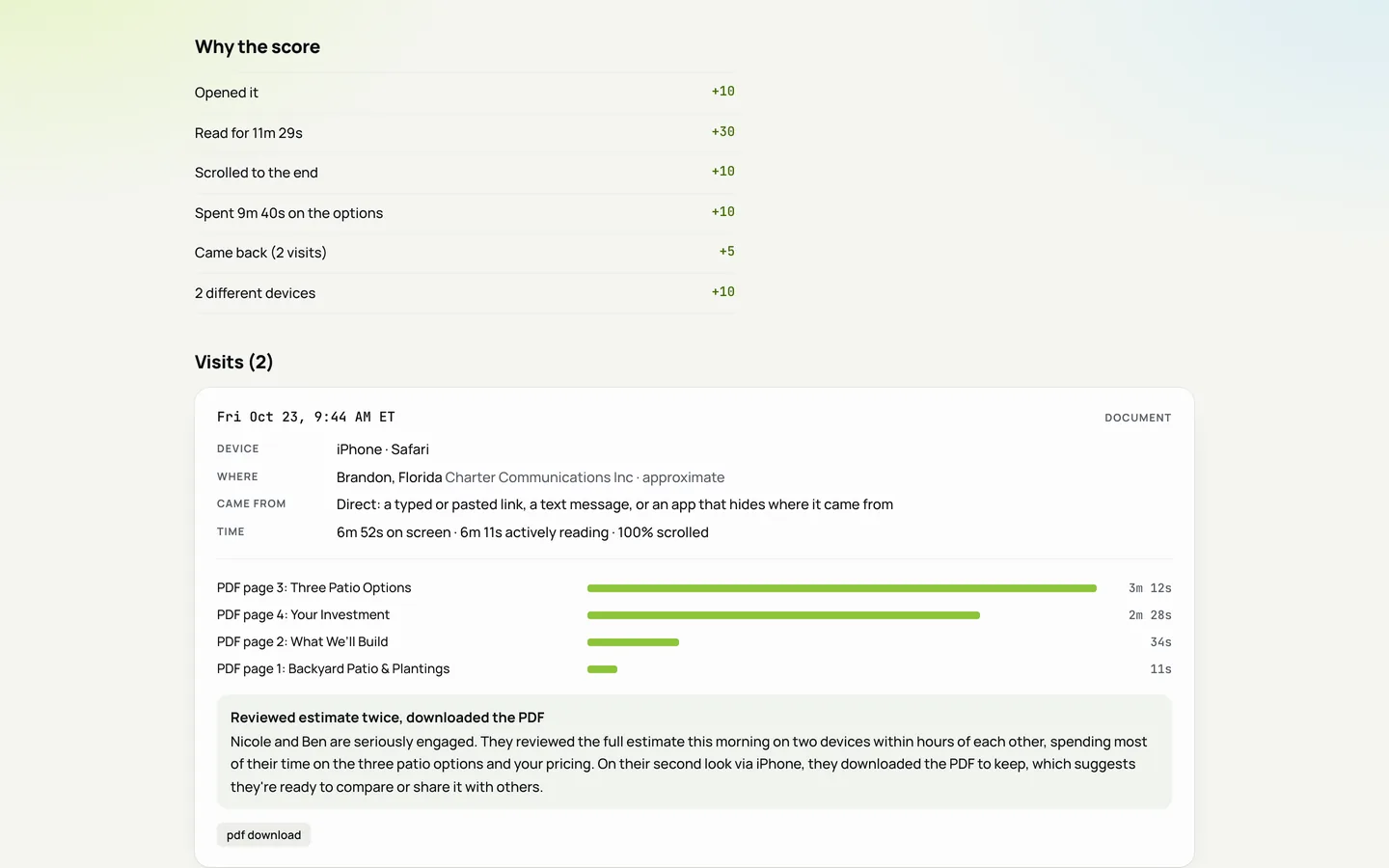
Every visit, page by page.

The device, the approximate town, time on screen, how far they scrolled and the time spent on each page of the PDF. The score shows its working, so you know why a lead is hot.

How the interest score adds up, and one visit broken down by device, place, time on screen and time on each page

Alerts

Know the moment it’s opened.

An alert lands while they’re still reading. When they close it, a summary follows by email: where the time went, what they clicked and what to do next.

Email alerts on every plan. Phone alerts on Pro.

A phone lock screen with a Proposal Pulse alert: Nicole and Ben Hargrove opened the Backyard Patio and Plantings Estimate
The alert, while they’re reading.
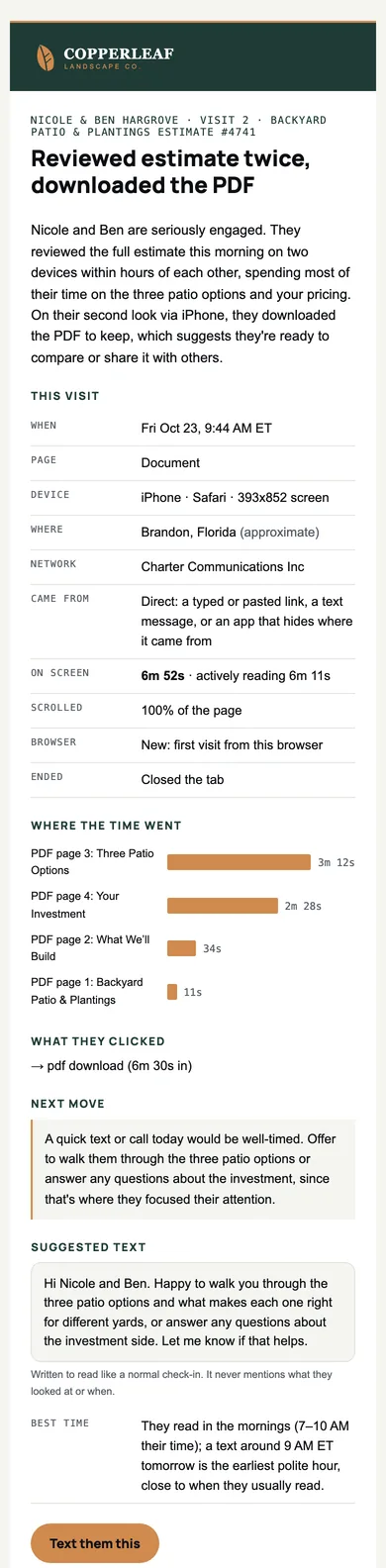
Visit summary email: the visit, where the time went, what they clicked, what to do, and a suggested text to send
The summary, once they’re done. Scroll it.

Follow-up

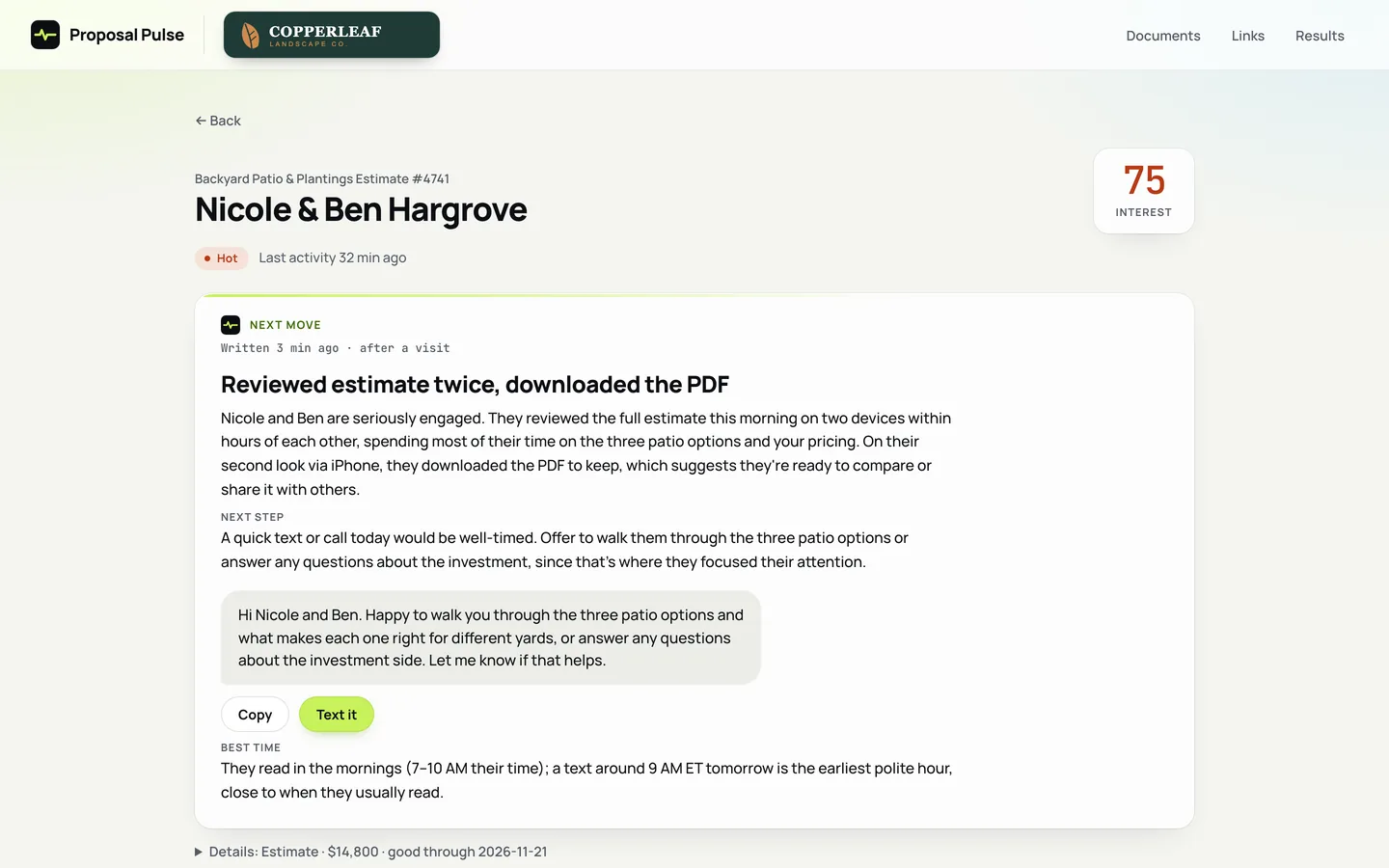
The follow-up, already written.

After each visit, Proposal Pulse writes a short read on the lead, the next step, and a text you can send as it is, with the best time to send it. It reads like a normal check-in. It never mentions what they looked at.

A hot lead with an interest score of 75, a written read of the visits, the next step, and a follow-up text with Copy and Text it buttons

Nudges

A nudge before a good lead goes cold.

Read it closely, then nothing for three days? You get a nudge with a check-in text ready to send. Same when an estimate is about to expire.

On Pro and Business.

Proposal Pulsenow

Gus & Marlene Petrakis have gone quiet on the estimate

They read it closely on Sunday and haven’t been back since. A short check-in now usually works better than waiting.

Text them: “Hi Marlene, just checking in on the palms. Happy to adjust the plan or the timing if that helps.”

Proposal Pulseyesterday

Heron Point HOA’s proposal expires Friday

Their proposal expires Friday. Good reason to reach out. Opened twice.

Two nudges as they arrive on a phone: a lead gone quiet, and a proposal about to expire

Results

See what’s winning you work.

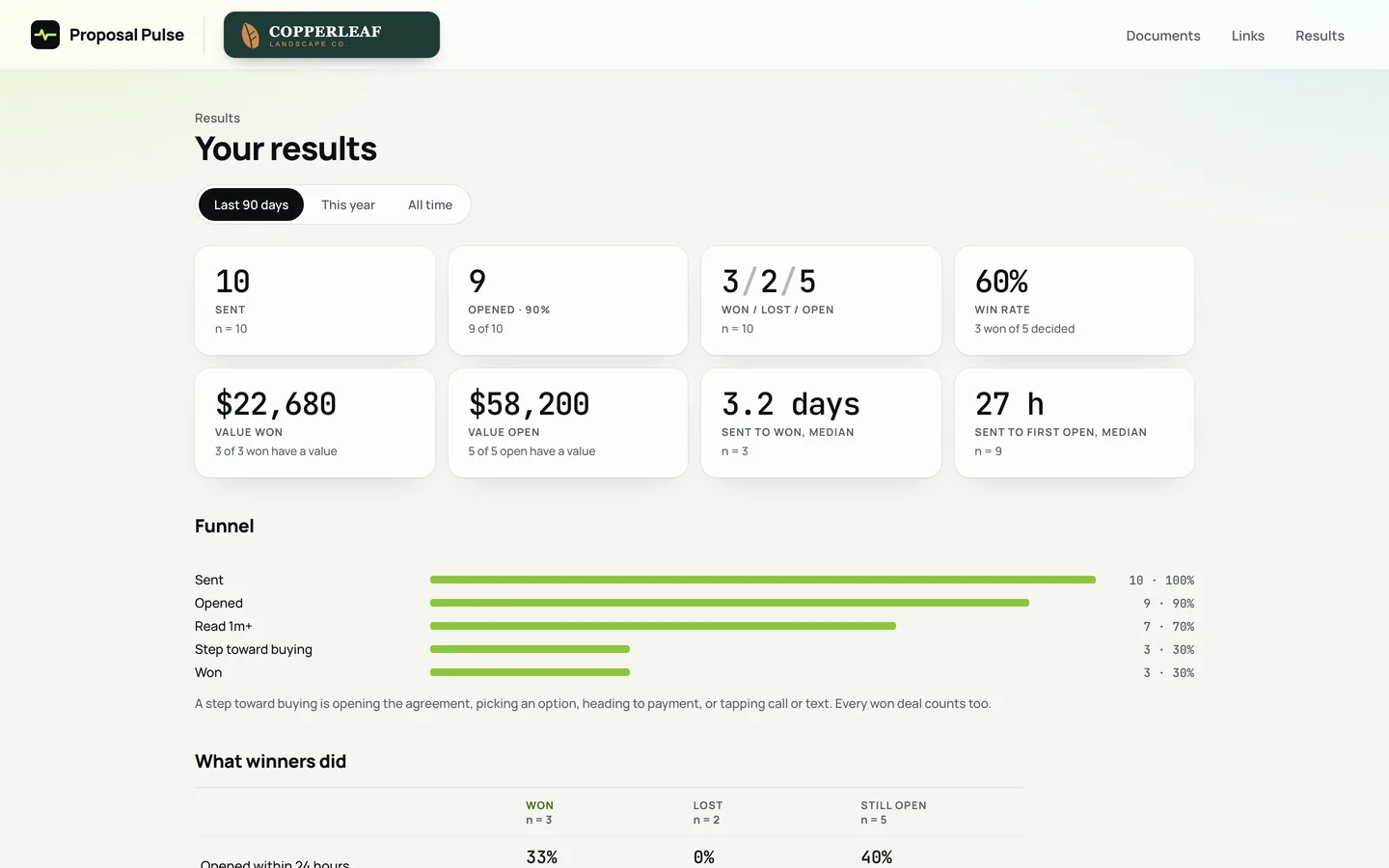
Sent, opened, won, win rate and time to close, with the count behind every number, and what the jobs you won had in common.

On Pro and Business.

Results: sent, opened, won, lost and open, win rate, value won and open, time to close, a funnel and what winning leads did differently

For your trade

Made for anyone who sends estimates.

It suits roofers, plumbers, general contractors, law firms, med spas, dental offices and chiropractors just as well.

Pricing

Start free. Move up when you need more.

  • Free

    $0

    Free, every month

    5 proposals a month

    Track every estimate and get the follow-up written for you.

  • Pro

    $19a month

    or $190 a year

    30 proposals a month

    Your own brand on every page, and an alert on your phone.

  • Business

    $49a month

    or $490 a year

    100 proposals a month

    For a crew or an office sending bids every day.

Questions

The short answers.

Does the homeowner need an app?

No. The link opens in any browser, on a phone or a computer. There’s nothing to install and no account to make.

Will they know it’s tracked?

Every tracked page carries a short line saying visits are recorded, with a link to the privacy page. The follow-up texts never bring it up. They read like a normal check-in.

What can you send?

Any PDF: an estimate, a bid, a quote or a proposal. On Pro you can send a video instead, like a walkthrough of the job, and see how much of it they watched.

Who sees the visits?

The business that sent the link, and Proposal Pulse itself, to run the service. It isn’t shared, sold or used for ads, and the privacy page lists everything that’s recorded.

What does it cost?

Free for 5 proposals a month. Pro is $19 a month and Business is $49, with 2 months free when you pay for a year. See every plan.

When can you start?

Proposal Pulse is in early access. Leave your email below and you’ll get one when it opens.

Early access

Start free.

The free plan tracks 5 proposals a month, with email alerts, visit summaries and the follow-up texts. Leave your email and you’ll get one when early access opens.

The privacy page says what the form keeps, and why.